"Hey, any update?"
Every deadline tracked. Every client kept.
Track every key date (on Pro, AI reads the contract and proposes them), confirm every one, and your buyer gets an app with your name on it. They see the house, a progress bar and what's due next, so they stop texting you for updates. After closing, they keep it.
- Built for the SC purchase contract, sold locally in the Upstate
- You confirm every date. It's a reminder tool, not legal advice.
- Love it or your money back: 30-day full refund
How it works
Three steps from signed contract to a calm client
Add the deal
Pro: upload the signed PDF or forward the "Completed" email. It works with paperwork from zipForm/Authentisign, DocuSign or Dotloop, including the other agent's. Solo: you type in the key dates yourself. Solo doesn't include AI contract reading.
Confirm every date
On Pro, each proposed date comes back with the spot in the contract it came from and a confidence label. Nothing is saved until you check and confirm it. On Solo, the dates are the ones you entered.
Invite your client
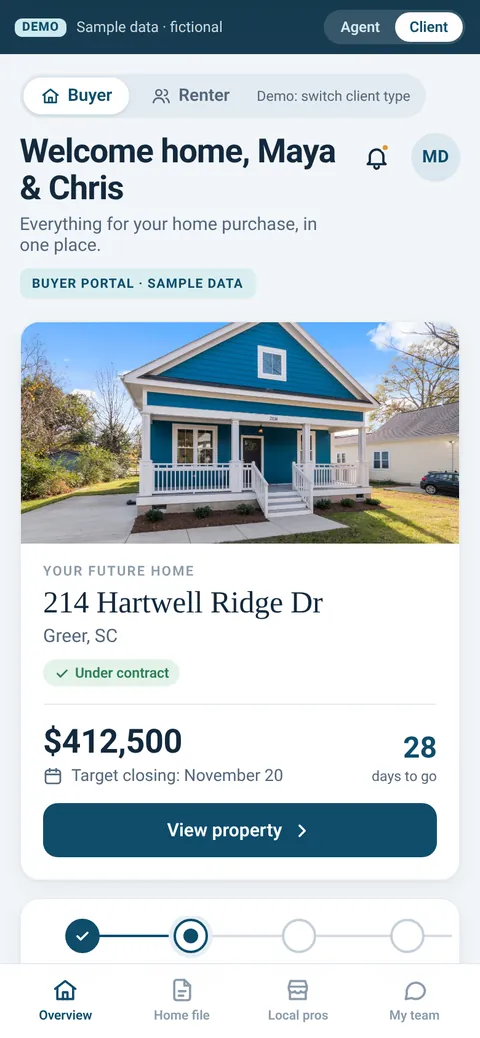
Your buyer gets Nestward with your name on it: their home, a progress bar of key dates, next steps, documents and an alert when a date moves.
AI contract reading is the only Pro-only feature. Both plans get deadline reminders and the client app. AI reads the contract and proposes the dates. You confirm every one. Nestward is a reminder and client-update tool, not legal advice. You're still in charge of the deadlines.
The client portal
What your buyer sees
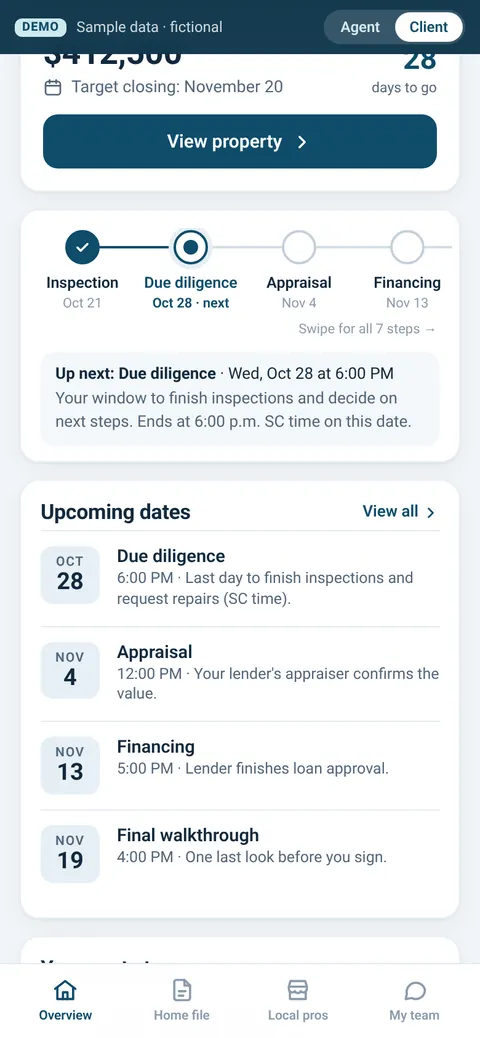
One simple app instead of a string of "any update?" texts. When they check something off, you see it. When a date moves, they get an alert, not a phone call to you.
Their home, front and center
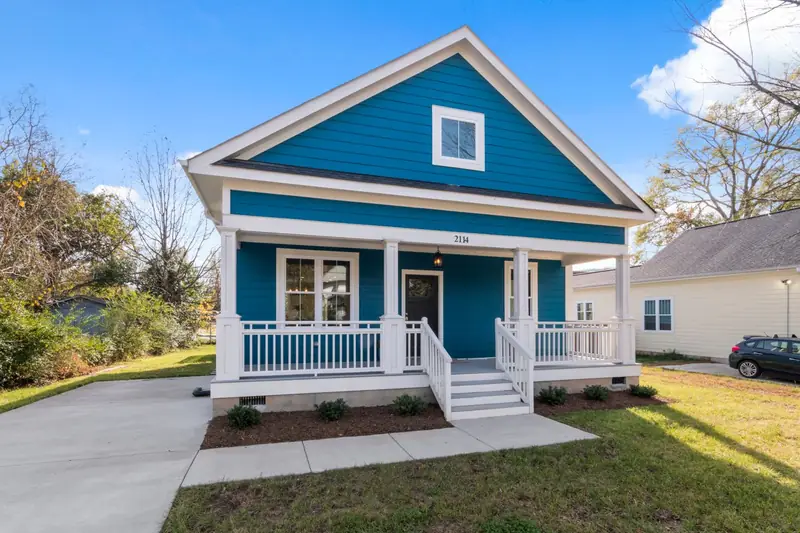
House photo, price, target closing and days to go.
A progress bar of key dates
What's next, in plain words, with the SC due-diligence cutoff spelled out.
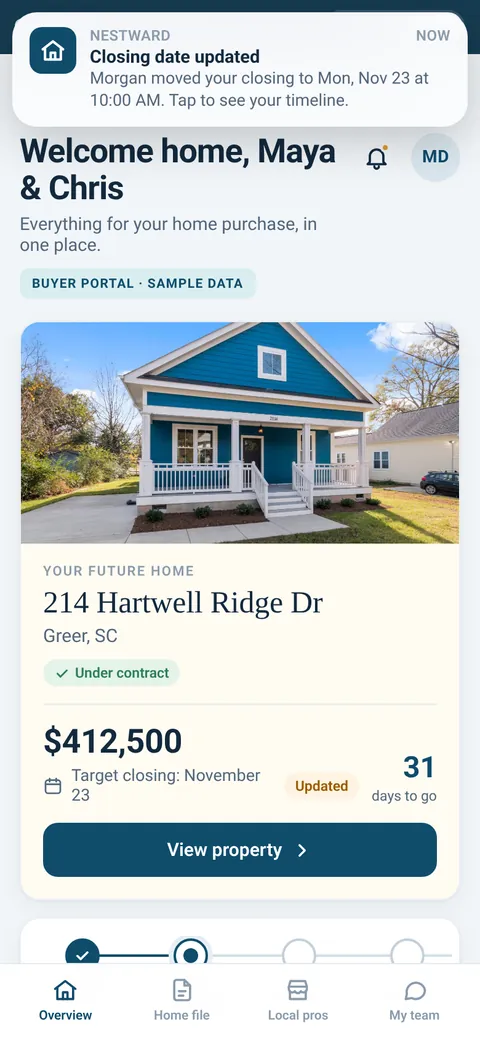
Alerts when a date moves
Edit a date and choose to notify your client.
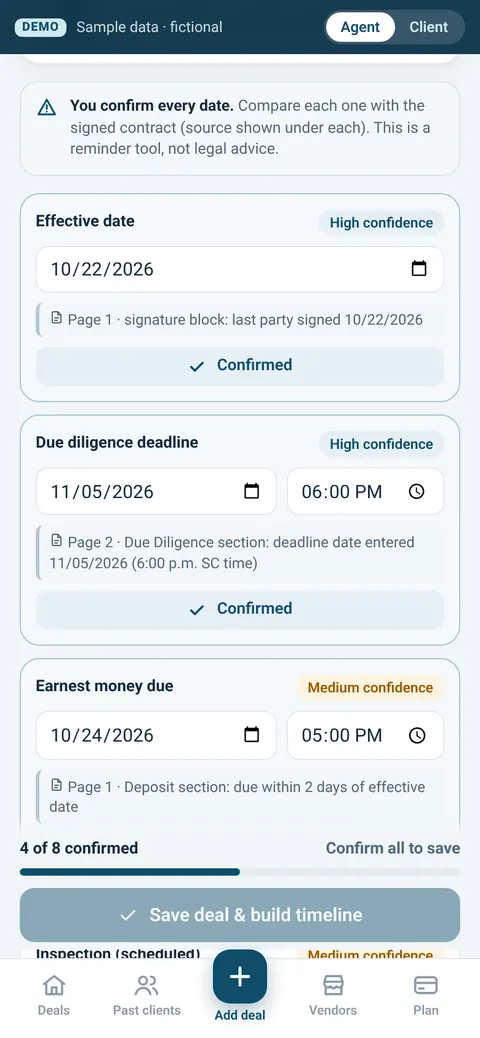
Your side: confirm each date
Each date shows its source in the contract. You confirm, then save.
Screens are from the demo. All names, addresses and prices are made up.
After closing
Most trackers stop at closing. Nestward keeps your name on their phone.
A home file they keep
Warranty, documents and reminders in one place on the client's phone.
Past-client touches
Reminders like the SC 4% legal-residence application, warranty and termite renewals, home anniversaries and an Upstate seasonal checklist.
Your local pros
Your preferred-vendor list, with call and text buttons.
"Refer my agent"
One tap opens a text from the client's own phone with your info ready to send. They pick who gets it.
Why the 4% reminder matters
SC owner-occupied legal residences can be assessed at 4% instead of 6%, but it isn't automatic. Owners apply with the county by January 15 of the first tax year claimed. Nestward reminds them and links the county form.
Source: S.C. Code Regs. 117-1800.1; Greenville County form. A reminder, not tax advice.
The referral gap
And 43% of buyers found their agent through a friend, neighbor or relative.
Source: NAR 2025 Profile of Home Buyers and Sellers
Rentals and military moves
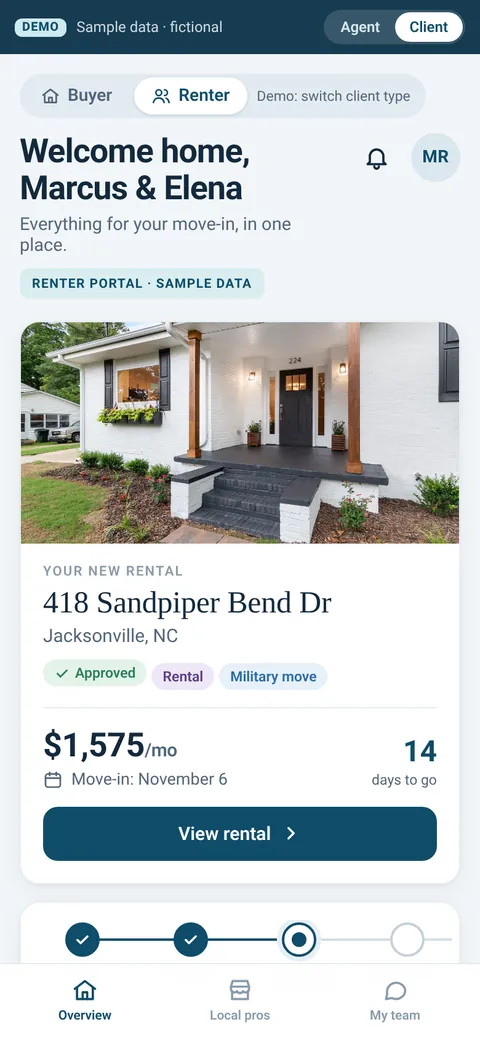
Move-in portals for renters, too
Renters get the same kind of portal: lease, deposits, utilities, renters insurance, move-in inspection and keys, with a virtual walkthrough step for military moves. You enter and confirm the move-in dates.
An early test idea. AI lease reading isn't built yet. Tell us if you do rentals near a base. That's what decides if we build it.
Pricing
Simple monthly plans. No free trial, a real guarantee.
Founding offer · first 10 agents only
Pro, including AI contract reading, locked for life. Love it or your money back within 30 days.
Claim a founding spotPro
- Everything in Solo, plus:
- AI contract reading: upload the contract or forward the "Completed" email, and AI proposes the key dates with their source. You confirm every one before it's saved.
Solo
- You enter the key dates yourself (no AI contract reading)
- Deadline reminders
- Client app with your name on it: home photo, progress bar of key dates, next steps, documents and alerts
- Home file after closing
- Past-client reminders, like the SC 4% legal-residence application
- Your preferred-vendor list
- "Refer my agent" button
FULL
REFUND
Love it or your money back.
There's no free trial. Instead, if you're not happy for any reason, email [email protected] within 30 days of signing up and you'll get a full refund. No other conditions.
Who's building this
Hi, I'm Brandon Keyser.
I've worked as a real estate agent in North Carolina, South Carolina and Georgia, so I know the "any update?" texts and the deadlines behind them. I'm a Marine Corps veteran, a husband and a dad. I'm building Nestward in the Upstate for agents who want every date tracked and every client kept.
FAQ
Honest answers
Is it built yet?
The demo is a preview with sample data, and a working version is in progress. That's why founding spots are priced low and locked for life. Try the demo: use the Agent / Client switch at the top to see both sides.
What if the AI misreads a date?
That's why you confirm every date before it's saved. Each one shows where in the contract it came from and how confident the reader is. If there's an amendment, you upload it and confirm the new dates. It's a reminder tool, not legal advice.
My brokerage already has a TC.
Great, keep them. Nestward isn't replacing your TC. It's the client-facing part: the app your buyer checks instead of texting you, plus the home file after closing. Your TC can show up right on the client's team card.
I already use Dotloop, SkySlope or zipForm.
Keep using it. Nestward doesn't replace your e-sign or compliance system. You upload the signed PDF or forward the "Completed" email, so it works with any of them. Direct connections aren't built yet; we'll build them based on what agents actually use.
Is my client data safe?
Each agent can only see their own deals, and contracts sit in private storage, not public links. Nestward never asks for Social Security or bank numbers. A written privacy policy will be published before any real client data goes in, and clients can delete their account.
Does it know SC deadlines?
It's set up for the SC purchase contract. For example, the SC due-diligence deadline is 6:00 p.m. SC time on the date entered in the contract, and the client portal spells that out. Source: SCR Form 310
Is there a free trial?
No. Instead: love it or your money back. Email [email protected] within 30 days of signing up for a full refund, no other conditions.
Can I cancel?
Yes, anytime. In your first 30 days, email [email protected] for a full refund. After that, cancelling takes effect at the end of the month you've paid for. Founding agents who cancel lose the $39 price if they come back later.
I don't do enough deals to pay monthly.
Fair. That's why there's a $49 Solo plan, and founding agents get Pro at $39 locked for life. The past-client side keeps working between deals too.
Founding agents
Claim one of 10 founding spots
Pro at $39/mo, locked for life. Love it or your money back within 30 days. Brandon will reach out to walk you through the demo.
Founding spots open soon. Email [email protected] to claim yours.
Want to look first? See the 3-minute demo →